Notes / · 7 min
When does an intermediate deserve its own item number? Seven criteria
Every stock record for a semi-finished part costs an order, an issue, a receipt and maintenance on every engineering change. A rule for deciding, per part family, whether a blank or a weldment gets its own item - or stays an operation on the production order.
A part between its first and last operation - a laser-cut blank, a bent bracket, a galvanised weldment - can live in an ERP in two ways:
- The operation model. The part is one item. Its progress is tracked on the production order, operation by operation. Confirming an operation means recording how many pieces are finished at that step; operations can also be confirmed together at a milestone operation.
- The stock model. Every stocked intermediate state (blank, bent part, galvanised part) gets its own item number and stock record, with stock movements between the states.
The usual model of discrete manufacturing - as described by APICS/ASCM and used in MRP systems - is the operation model, with an exception at the decoupling point: where the flow of pieces separates from a single production order, the semi-finished part gets its own item and stock record.
Note that the number of barcode scans is the same in both models - you scan at every physical move. What differs is the number of documents, items and orders. So the decision isn’t “item or operation” for the whole company. It’s a rule, applied per part family.
The rule: when an intermediate gets its own item
The criteria below are a proposed company rule, not an ASCM definition - ASCM describes the decoupling point more generally, as a place of strategic stock. An intermediate gets its own item number and stock record if at least one of these applies:
- Batch. The production batch isn’t the demand batch. Nesting cuts 100 pieces from a sheet, the order needs 30, and the remaining 70 have to belong somewhere.
- Time. It waits between two operations longer than the work centre’s threshold (a shift or a day, set per work centre), because the machine is running something else. An order open for weeks breaks into several orders with a stocked intermediate.
- Several parents. The part goes into more than one product or assembly - a shared blank, a weldment used in two product types.
- Subcontracting. It leaves the company and comes back in different batches than it left - one truck to the galvaniser made up of ten orders, part of it returning to stock.
- Stock-driven. It’s replenished by stock level (minimum, kanban, a production store), not by order.
- Sold on its own. It’s sold or issued as a spare part.
- Change of stock owner. It moves between departments with different responsibility for the stock - welding → store → assembly.
Everything else is an operation on the production order of the same item.
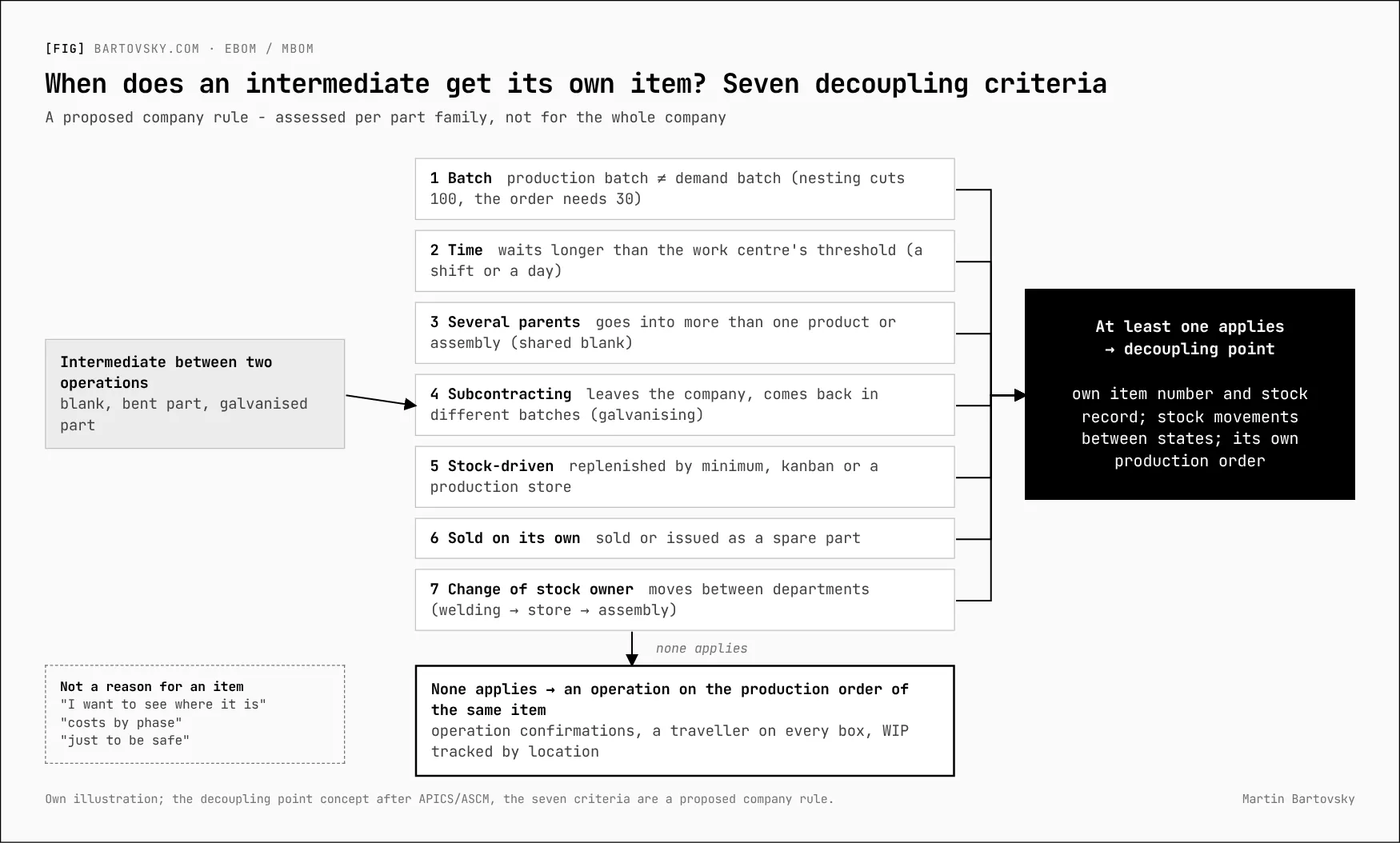
What isn’t a reason for an item
- “I want to see where it is.” That’s what WIP locations and the traveller are for, not an item.
- “I want costs by phase.” Costs are carried by operations and confirmed times.
- “Just to be safe.” Every extra item means an order, an issue, a receipt - and maintenance on every engineering change.
What the operation model needs to work
The operation model is leaner, but only if the shop floor supports it:
- Every box, pallet or bundle has a traveller (order number, item, operation, quantity), without exception.
- Confirming an operation records where the pieces are put (an intermediate store, a rack), and the system can show WIP as order × operation × location.
- Partial confirmations and moving pieces between orders are standard steps, not exceptions.
- Overproduction (the laser cut more than needed) is received into stock as a standard step.
- Subcontracting can combine several orders and track pieces at the subcontractor, including partial returns.
- WIP can be counted and valued at period end.
If these aren’t in place, the stock model creeps back in through the side door - as “temporary” items that never go away.
Migration is the cheap moment to clean up
A new ERP is the only cheap moment to drop intermediates that exist because “that’s how the old system did it”. After go-live they carry stock, orders and costs, and removing them is a project. In some companies the problem is the opposite: intermediates are missing from the data altogether and have to be added during the migration. Either way, apply the seven criteria to every existing intermediate before it’s migrated.
Two more things a row of the MBOM carries
The ERP doesn’t see a BOM as just a tree of parts. Each row has an item category that decides how it’s handled, and it can be allocated to an operation of the routing.
| Item category | What it means | Example |
|---|---|---|
| Stock item | Reserved, issued from stock, costed | Blank, standard part, plate |
| Non-stock item | Bought directly for the order, never stocked | One-off purchased part for a job |
| Variable-size item | Quantity calculated from dimensions | Plate: length × width × thickness → kg |
| Document | Link to a drawing or instruction; nothing is consumed | Welding procedure as a document |
| Text item | A note for production | “Degrease before painting” |
Together with item flags, usage and BOM status, the category decides whether a row is relevant for MRP and for costing - not every row is planned and costed automatically. Engineering doesn’t know these flags and shouldn’t set them; they belong to manufacturing engineering and master data.
A component belongs to the operation that actually consumes it: welding wire to welding, paint to painting, bolts to assembly. Without an explicit allocation, most systems tie every component to the first operation. That drives the requirement date - and backflushing at confirmation, depending on how the process is set up.
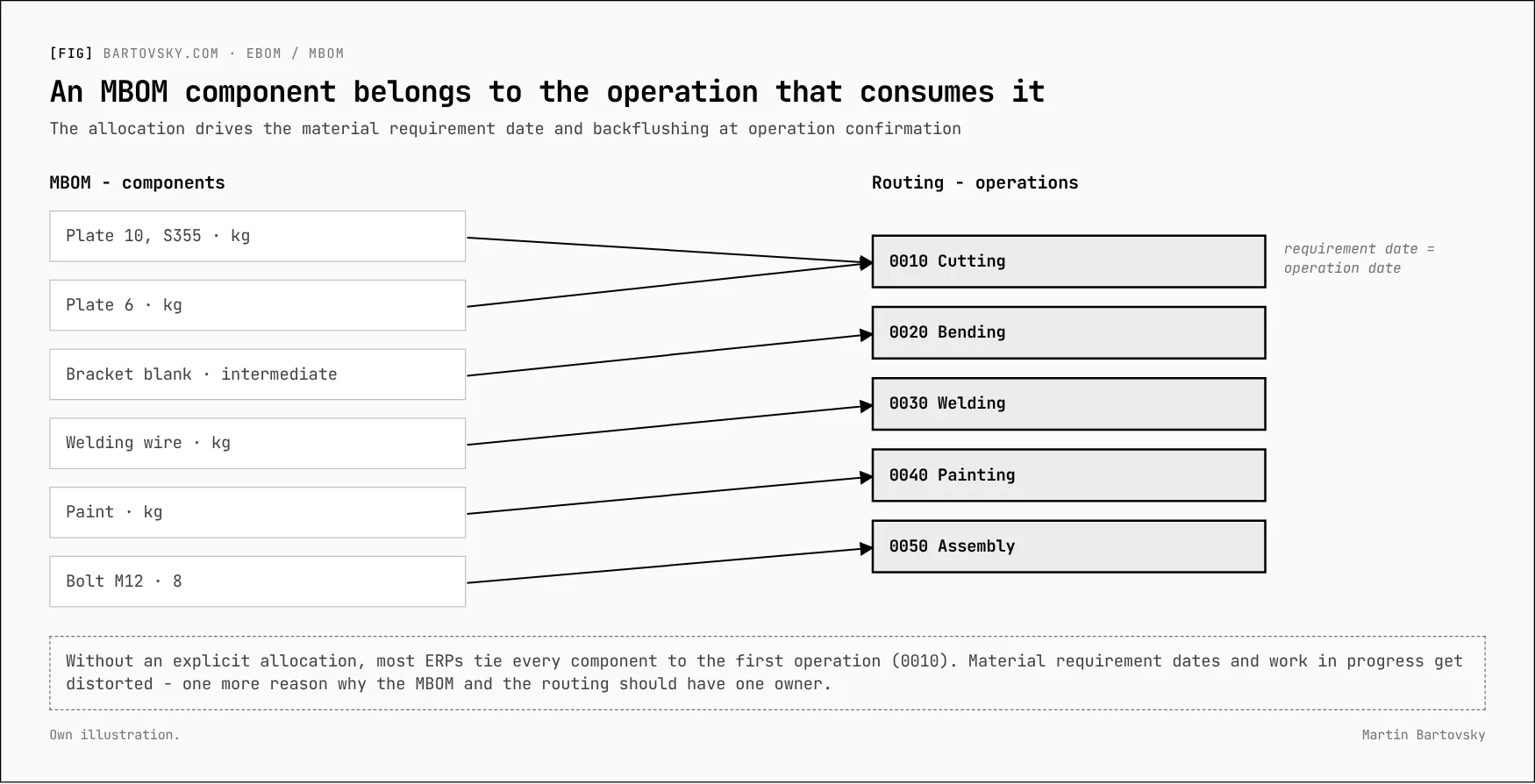
A wrong allocation distorts both the material requirement dates and work in progress. It’s one more reason why the MBOM and the routing should have one owner.
And the opposite: phantoms
Engineering groups parts into sub-assemblies by model logic - “electrical”, “side panel fit-out”, “fastener kit”. Physically, that sub-assembly never exists and never sits in a store. If it reaches the ERP as a normal assembly, MRP creates procurement proposals for it - and with them orders, receipts and issues nobody wants.
ERPs solve this with a phantom (pass-through) assembly: a flag on the item or on the BOM row saying the level exists only logically. Planning passes through it and hands the demand straight to its components; no separate order is created.
| Node in engineering | Production sees it as | Who decides |
|---|---|---|
| Physical sub-assembly (a weldment, stocked) | A normal made item | Engineering proposes, manufacturing engineering confirms |
| Grouping for a tidy model | A phantom, or no level at all | Manufacturing engineering |
| A kit of parts issued together | A phantom, or its own item if it’s kitted in advance | Manufacturing engineering and the warehouse |
For engineering, only one thing follows: the import template should indicate, for each assembly, whether it’s a physical assembly or just a grouping. The final word belongs to manufacturing engineering.
For the workshop: which part families meet which of the seven criteria today - and which existing intermediates meet none of them?
The BOM series
- Your ERP will import BOMs from Excel. The second import is the problem.
- When does an intermediate deserve its own item number? Seven criteria (this note)
- Engineering changes: one number, revision or new part, and where-used first
- Ten tests for your BOM import before go-live
- From Excel to PLM: six levels of EBOM-to-MBOM tooling
- BOM health: the numbers that show the process still works
- The quote is the first version of the BOM
[->] next step
Where do your numbers stop adding up?
Start with a short call. Bring one report nobody trusts - I'll trace it back to where the data gets captured.