Notes / · 10 min
Your ERP will import BOMs from Excel. The second import is the problem.
The engineering BOM says what a product is made of; the manufacturing BOM says how it is made. Moving one into the other is not an export and an import - it's a compare-and-merge, and the rules you set at go-live will hold for years.
A manufacturer introduces a new ERP. The project plan says engineering will hand over bills of materials by importing them from Excel. For the first load, that’s a perfectly sensible plan. The open question is what happens on every change after that - and the rules set during the implementation will hold for years.
This is the first part of a series about getting engineering data into an ERP without the two quietly drifting apart. It’s written for discrete manufacturing - a design office working in CAD, with or without PDM, and an ERP that runs BOMs, routings and production orders. The examples come from metal fabrication: sheet metal, blanks, bending, welding, stamping, painting and galvanising. That’s where the gap between what engineering draws and what production makes is widest. The principles apply just as well to assembly, machining or electrical work.
Two BOMs, two owners
The engineering BOM (EBOM) says what a product is made of. The manufacturing BOM (MBOM) says how it is made. Both are right; they answer different questions and they have different owners. And before either of them, there is a third view: the model tree in CAD, structured by design logic and full of helper geometry that has no place in any BOM.
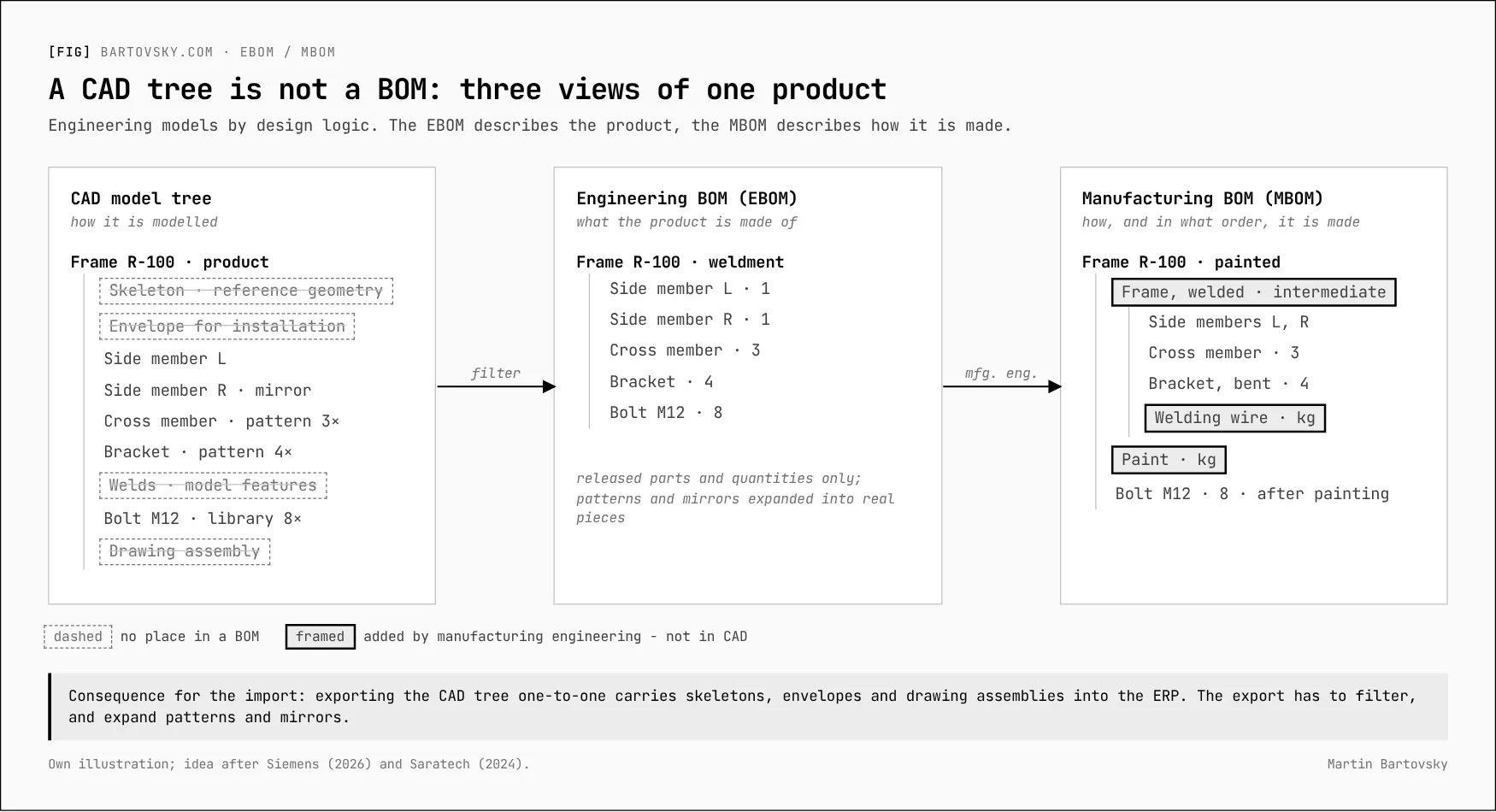
The MBOM always has more rows than engineering draws. Intermediates, raw material with a consumption norm, welding wire, paint - none of it is in CAD. Manufacturing engineering adds it.
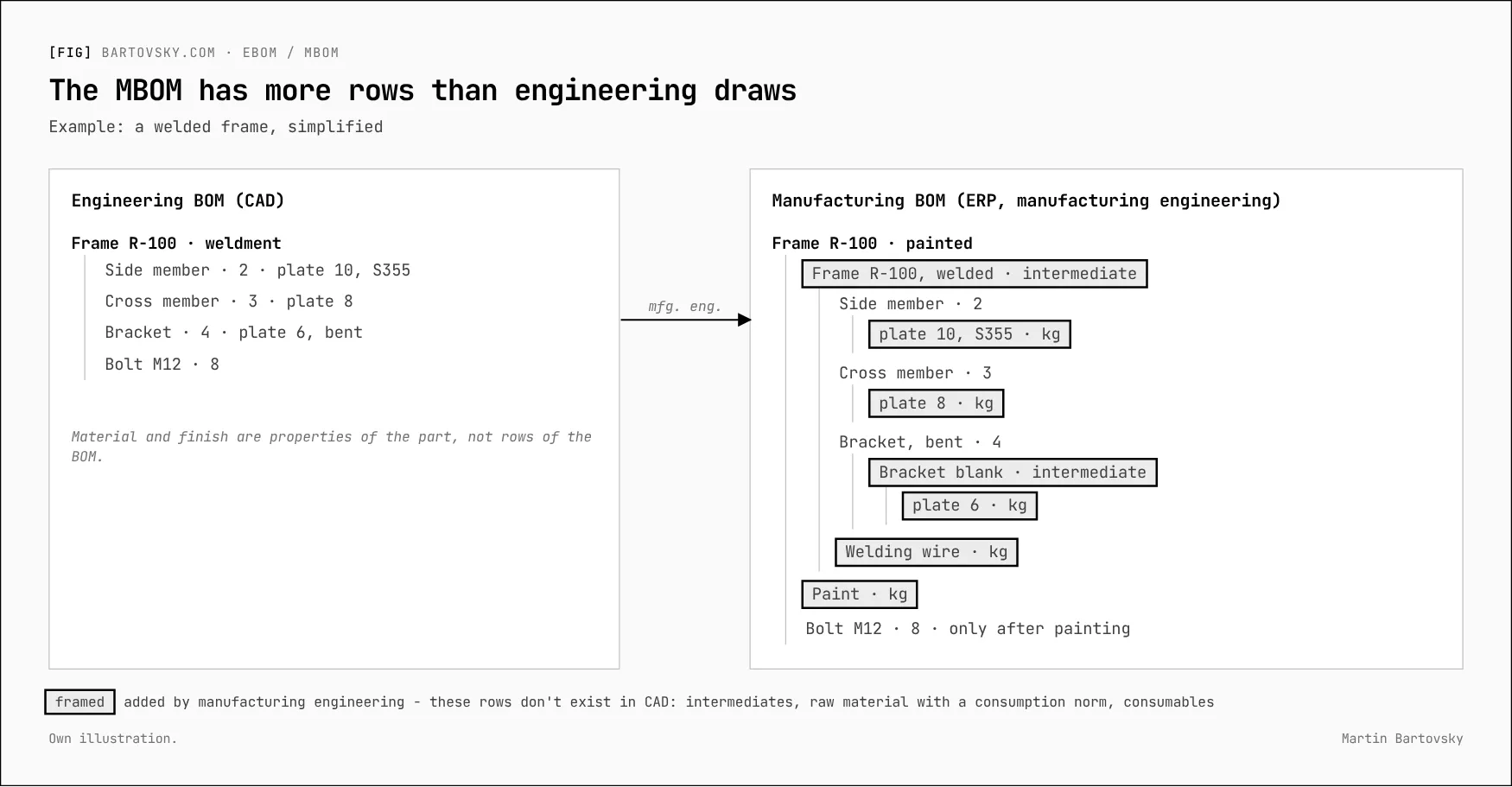
Which leads to the first rule: engineering owns the EBOM and its release; manufacturing engineering owns the MBOM, the routing, intermediates, phantoms, losses and co-products. Every import from engineering has to leave the rows manufacturing engineering added exactly where they are - or they have to be re-created after every change.
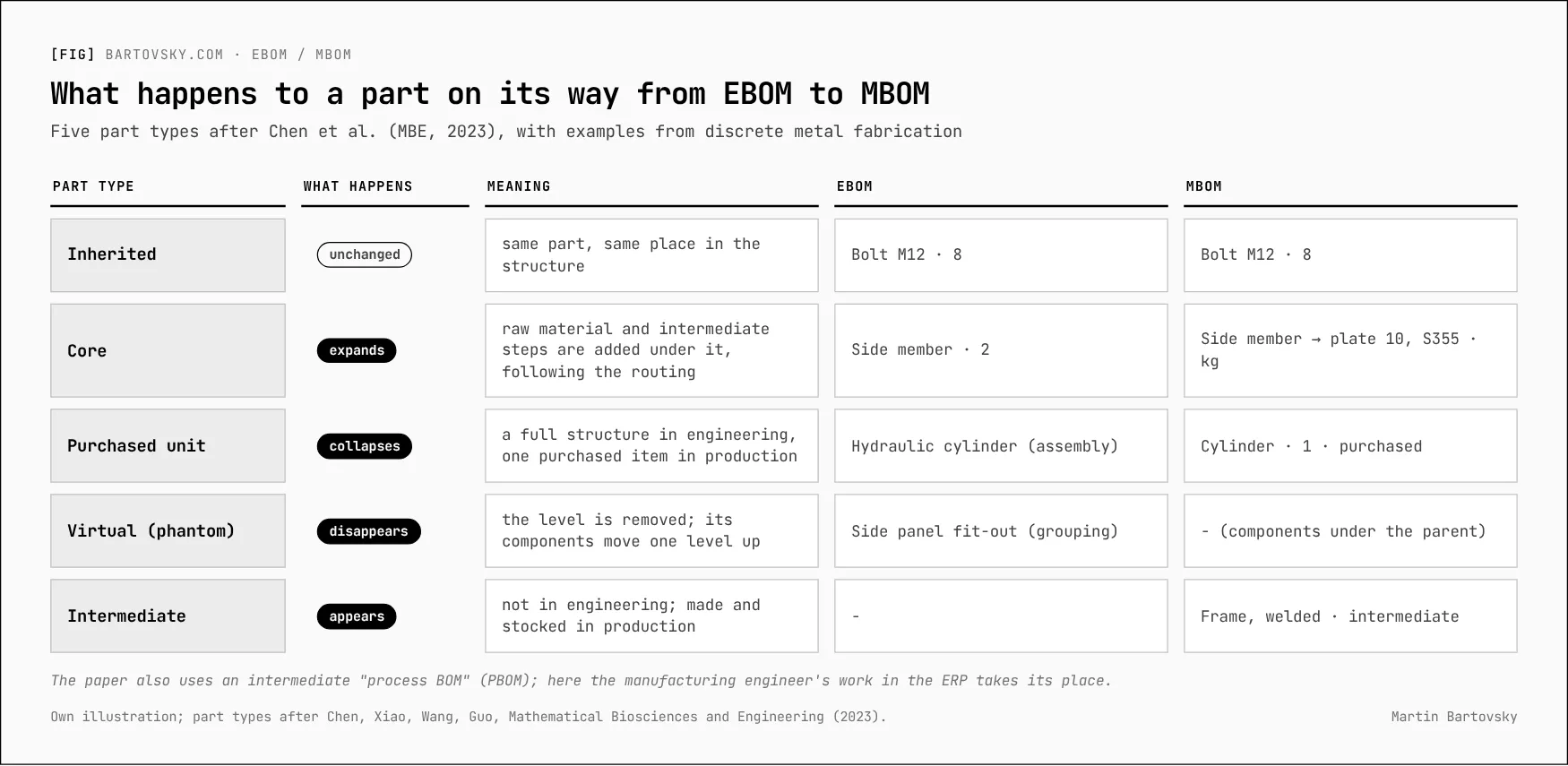
Seen from a single part, one of five things happens on the way from EBOM to MBOM:
What an Excel import solves - and what it doesn’t
| Situation | What the import does | Risk |
|---|---|---|
| New product, first load | Works well | Quality of the input: units, item numbers, typos |
| Bulk migration of existing products | Works | Old data moves across with its old mistakes |
| Change to an existing BOM | Overwrites the whole BOM, or creates another one | Overwrites manufacturing engineering’s work, or two versions of the truth |
| Change to a part used in several products | Each BOM separately | One of the products gets forgotten |
| Traceability | A file on a disk or in an e-mail | No way to prove what engineering handed over, and when |
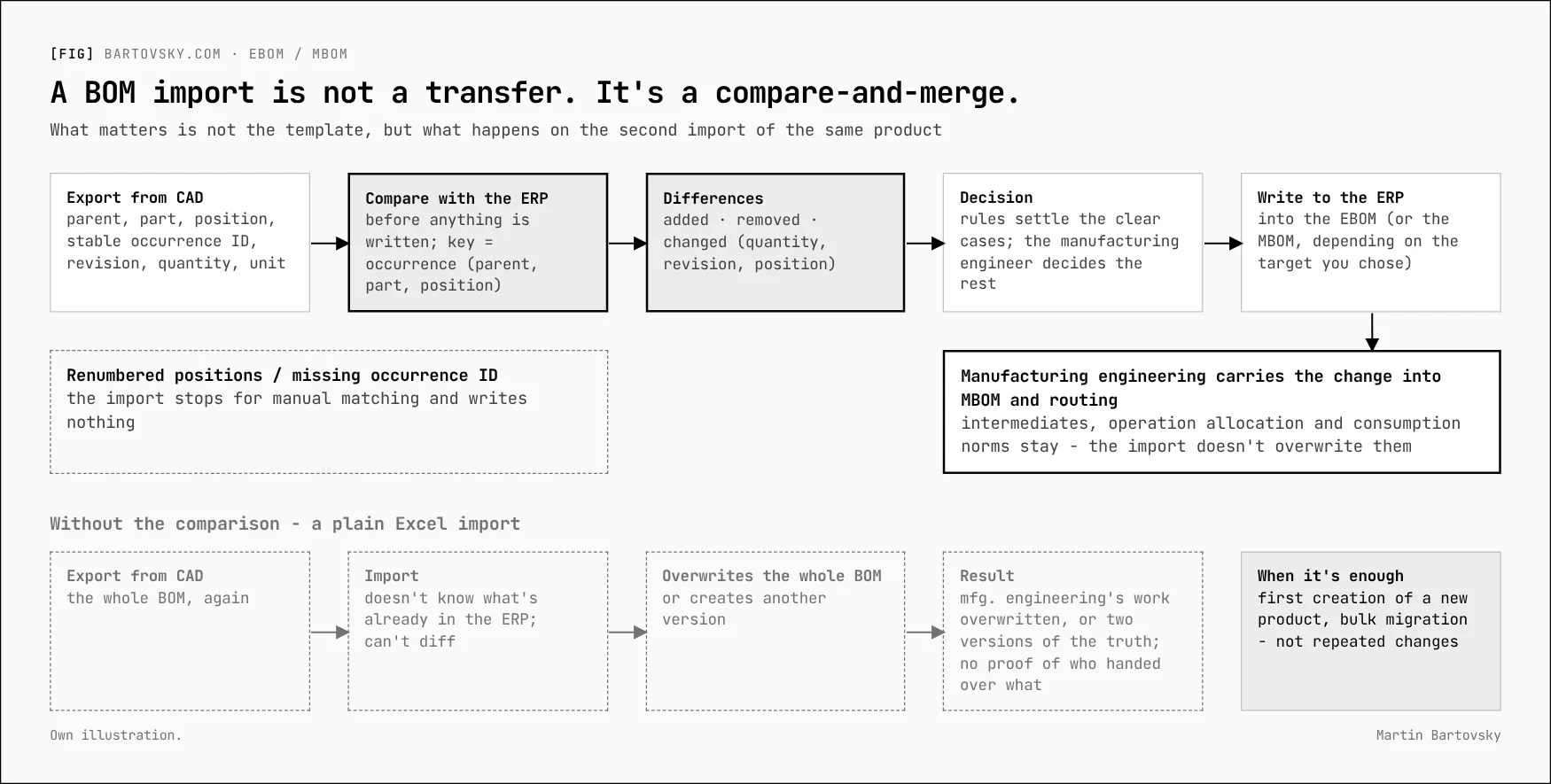
Excel is a transfer, not a process. It doesn’t know what is already in the ERP and it can’t produce a difference. So the decisive question isn’t what the template looks like - it’s what happens on the second import of the same product.
It matters because BOMs don’t drift apart through one big mistake. They drift quietly, one change at a time:
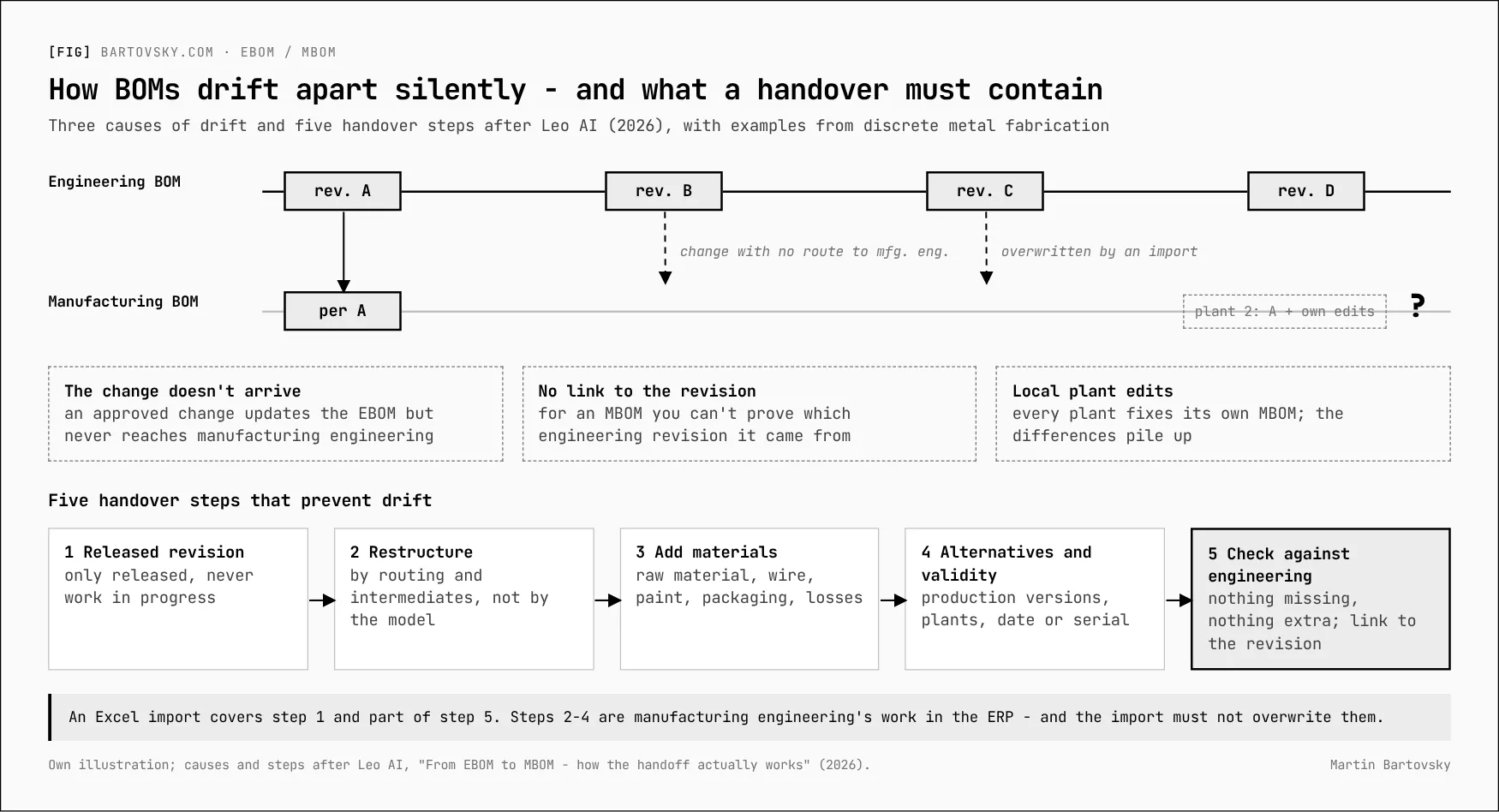
The reasonable minimum to ask of an implementation: the import compares the new state with what is in the ERP and lists the differences - added, removed, changed - before it writes anything. If that can’t be delivered, someone has to watch the differences by hand, and that has to be planned as capacity, not hoped for.
Six decisions engineering should be part of
These questions get answered one way or another. Either deliberately now, or by the first import.
1. Where does the import go? Many ERPs distinguish BOMs by usage - engineering, production, sometimes costing. Option A: engineering imports into an engineering BOM, and manufacturing engineering derives the MBOM from it. Each owns what it knows. Option B: engineering imports straight into the MBOM. It’s faster to start, but engineering then effectively owns a production structure, including intermediates and fasteners, and every later import overwrites manufacturing engineering’s work - unless only the changes are imported, which needs stable positions and has to know where a part was moved. B makes sense where the production structure barely differs from the engineering one: tools and fixtures, for example. For products with many intermediates and frequent changes - complex weldments on a customer’s drawing - I’d choose A. The choice doesn’t have to be the same for every product.
2. Who creates item records, and how are they numbered? Every material row needs an item in the ERP. Is it created by engineering on release, or by master data on request? And how do drawing number, ERP item number and the customer’s part number relate? One number for everything is tempting. It usually lasts until the first customer with their own numbering, or the first non-interchangeable revision.
3. What’s in the Excel file and what isn’t? Standard parts, fasteners, welding wire, paint, packaging: which come from CAD, which does engineering add by hand, which does manufacturing engineering add? Is the raw material (plate 10 mm, S355) a property of the part or a row of the BOM? My proposal for discussion: engineering decides what the part is made of - grade, thickness, blank size. Manufacturing engineering decides how much is consumed, and at which operation.
4. A stable key for each row. On a change, the import must recognise that this is still the same occurrence of the same part in the same assembly. Positions must not be renumbered on every CAD export, or every import looks like “everything deleted, everything new” and comparing differences becomes meaningless. Identity is parent + part + position; where the same part appears several times in one assembly, the export needs a stable occurrence ID. Without one, the import should stop for manual matching and write nothing. (More on this in the ten tests.)
5. Revisions and changes. Does a drawing revision become a new item or a revision of the existing one? Who creates the change number, and is there one number for engineering and manufacturing engineering? Engineering usually doesn’t decide the effective date - but it must say whether a change is interchangeable. (Part 3 is about exactly this.)
6. What does “released” mean? Only released data should reach the ERP. Without PLM, someone has to say who releases and where that’s visible. If anyone can send an Excel file at any time, the ERP will fill up with designs that are still in progress.
One process won’t fit every kind of production
| Type of production | Where the structure comes from | What it means for the import |
|---|---|---|
| Series parts to customer design (e.g. automotive stampings) | The customer’s part; own engineering mainly does the method and the tool | The production structure (blank, stages) is partly set by the method in tool engineering. Who enters it into the ERP? |
| Tools and fixtures | Own design, one-off production | MBOM ≈ EBOM + standard parts. Importing straight into production (option B) makes sense here |
| Complex weldments or assemblies to customer drawing | Customer drawing, frequent customer changes | The most intermediates (blanks, bends, paint) and the most changes. Option B is riskiest here |
A minimal import template
The template is secondary - but without a few columns, changes can’t be recognised at all.
| Column | Required | Why |
|---|---|---|
| Parent item | yes | Structure |
| Position | yes | Stable row key |
| Item number | yes | Link to the ERP item record |
| Drawing number and revision | for made parts | Traceability: what was handed over |
| Description | yes | Human check |
| Quantity | yes | - |
| Unit of measure | yes | pcs vs kg vs m²: the most common source of errors |
| Item type | yes | made / purchased / standard part |
| Raw material (grade, thickness, size) | for made parts | Input for manufacturing engineering’s consumption norm |
| Customer part number and change level | for customer parts | Parts made to the customer’s drawing |
| Derived from | for new parts | Link to the source part; manufacturing engineering can reuse the routing |
| Change number | on change | Link to change management |
| Engineering note | no | - |
Plus a file header: who, when, from which CAD state, who released it, target plant and BOM usage, base quantity and unit, mode (full snapshot or changes only), and a reference to the previous transfer it is compared against. The source should be a CAD export, not retyping. Every manual step is a place where the data can drift.
What to do before go-live
- A workshop with engineering and manufacturing engineering on the six decisions above.
- Agree with the implementation partner how BOMs will be uploaded after go-live, and that differences are shown before anything is written.
- A pilot on one real assembly - the one with the most intermediates and changes - then on a product of a different production type.
- After go-live, a handful of numbers that show whether the process still holds (part 6).
This series is based on a discussion paper I use with engineering and manufacturing teams before an ERP go-live - with workshop questions, a responsibility matrix and a pilot plan. If you’re about to go through one, get in touch.
The BOM series
- Your ERP will import BOMs from Excel. The second import is the problem. (this note)
- When does an intermediate deserve its own item number? Seven criteria
- Engineering changes: one number, revision or new part, and where-used first
- Ten tests for your BOM import before go-live
- From Excel to PLM: six levels of EBOM-to-MBOM tooling
- BOM health: the numbers that show the process still works
- The quote is the first version of the BOM
Further reading: Saratech, The Need for Separate Design, Engineering & Manufacturing BOMs (2024) · Siemens, Why CAD BOM separation? (2026) · Chen, Xiao, Wang, Guo, Research on the integrated management and mapping method of BOM multi-view for complex products, MBE (2023) · Leo AI, From EBOM to MBOM - how the handoff actually works (2026) · Beyond PLM, Rethinking EBOM vs MBOM - data semantics (2025).
[->] next step
Where do your numbers stop adding up?
Start with a short call. Bring one report nobody trusts - I'll trace it back to where the data gets captured.