Notes / · 9 min
Ten tests for your BOM import before go-live
The most important test of a BOM import isn't the first load - it's the second. Ten scenarios to run with the implementation partner on one real assembly, the clean-up rules before migration, and a pilot plan with success criteria.
The most important test of a BOM import isn’t the first load. It’s the second. Before go-live, take one real assembly - ideally a weldment with blanks, bends, paint and standard parts - and run these scenarios with the implementation partner. (Why the second import is where it goes wrong: part 1 of this series.)
Ten scenarios
| # | Scenario | What has to go right |
|---|---|---|
| 1 | New product | The template goes through; item records are created, or the import says which are missing |
| 2 | Second import, no change | Nothing changes in the ERP. The best first test. |
| 3 | Quantity of a part changed | Recognised as a change - not as a deletion plus a new row |
| 4 | Part replaced by another | Manufacturing engineering’s work around the part stays; the engineer gets notified |
| 5 | Part used in several products replaced | You can see everywhere it’s used, and someone decides whether it changes everywhere |
| 6 | New part added | The manufacturing engineer knows it has to be placed in the production structure |
| 7 | Part removed that is in stock | A phase-out proposal, not an immediate deletion |
| 8 | New drawing revision, no change in shape | Clear whether a new item or only a revision is created |
| 9 | New product as a copy of an existing one | Unchanged parts keep their routing and intermediates |
| 10 | Positions renumbered in CAD | The import recognises it, stops for manual matching and writes nothing; the same for a part used twice in one assembly |
Every scenario that ends with “this is done by hand” is fine - as long as you know who does it, and how many times a month.
The test behind tests 3, 4 and 10: a stable key
On a change, the import has to recognise that this is still the same occurrence of the same part in the same assembly - even after manufacturing engineering moved it under an intermediate. PLM systems solve this with a link between the occurrence in the EBOM and its use in the MBOM. Without PLM, the CAD export and the ERP upload have to carry it.
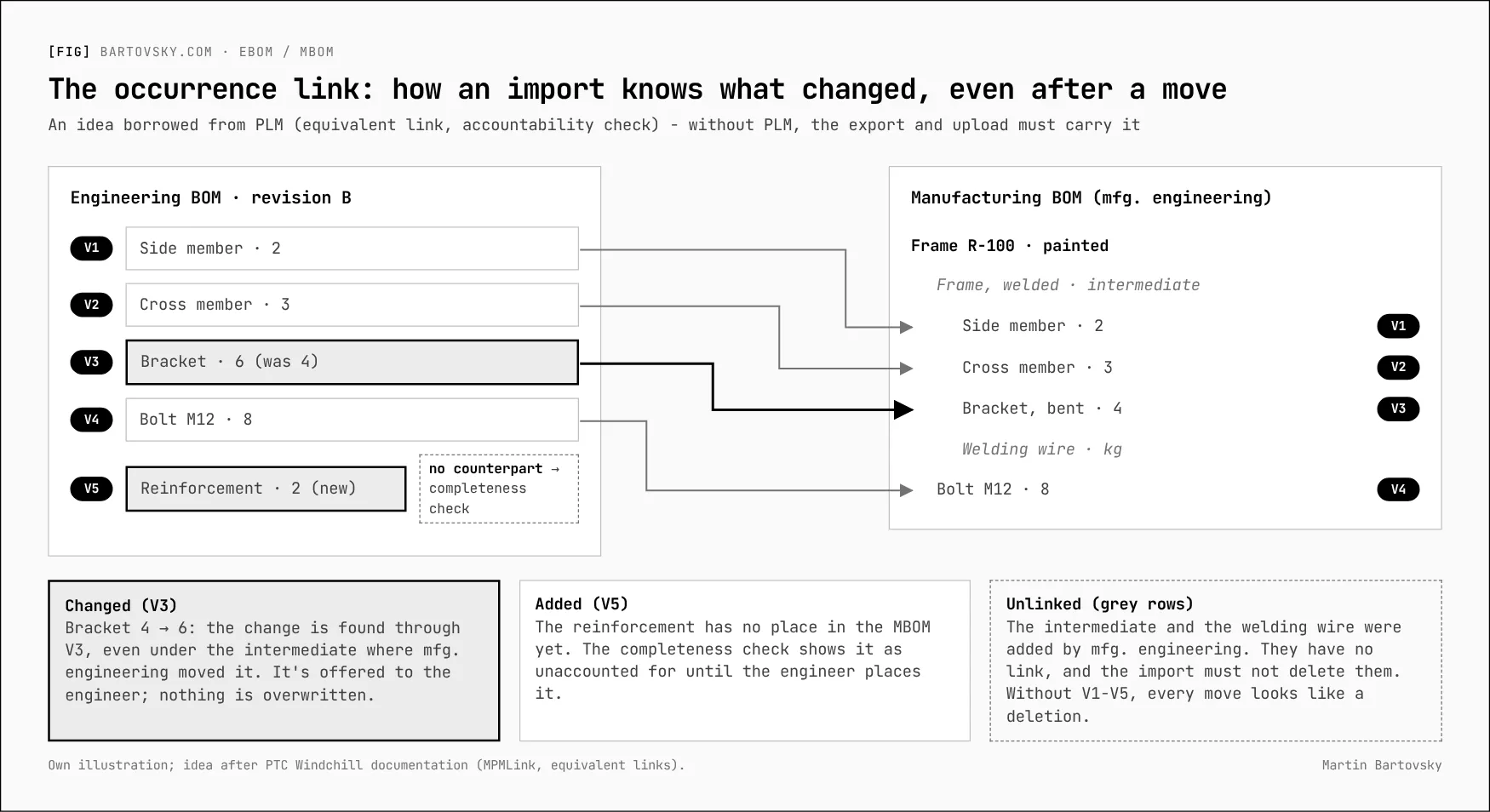
In practice: identity is parent + part + position. Positions are display values and must not be renumbered on every export. Where the same part appears more than once in an assembly, the export needs a stable occurrence ID. Without it, the import has to stop and write nothing.
Clean up before you migrate
Only what will be made or serviced should go into the new ERP; the rest stays findable in an archive. Every migrated BOM is a commitment to maintain it on every change.
| Category | Rule | Who decides |
|---|---|---|
| Active products | Migrate. Set the activity threshold once for everyone (e.g. made or sold in the last 24 months) | Manufacturing engineering and sales |
| Spare parts and service | Migrate, even if no longer made in series | Sales and service |
| Phasing-out and replaced parts | Migrate only with stock or open orders, and mark the phase-out | Manufacturing engineering |
| Inactive | Don’t migrate; archive with a way to look them up | Engineering |
| Duplicates (one part under two numbers) | Merge before migration, not after; check customer numbers, stock, documents and where-used first | Master data and engineering |
| Old intermediates | Re-assess against the seven decoupling criteria; drop those without a reason | Manufacturing engineering |
Checks before loading:
- Units of measure and conversions (pcs, kg, m²)
- BOMs without components, and components without an item record
- Cycles: a part that contains itself
- Zero or negative quantities, except correctly set-up by-products or co-products
- Positions and numbers according to the new template
After the trial migration, manufacturing engineering checks a sample of BOMs against what the shop floor actually does, and the owner of each category signs it off.
A pilot plan
The pilot proves on one real assembly that import, changes and the MBOM work - before the procedure is rolled out to everything.
Choose the assembly that has as many of the problems as possible at once: a weldment with blanks, bends, paint and standard parts, ideally with left and right parts and a customer change you know is coming. A second round follows on a product of another production type (a series part to customer design, an own product with options).
Roles
| Role | Task in the pilot |
|---|---|
| Engineering | CAD export, template, changes, where-used |
| Manufacturing engineering | MBOM, routing, intermediates; logs every manual intervention |
| Master data | Item records, numbering, checks before loading |
| Implementation partner | Upload, comparing differences, change numbers in the ERP |
| Coordinator | Plan, measurement, evaluation |
1. Preparation
- Choose the pilot assembly (engineering and manufacturing engineering)
- Find out the CAD and PDM version at the pilot plant
- Agree the upload route with the implementation, including comparing differences before writing
- Prepare the import template (the minimal one)
- Set the decoupling rule for the pilot part family
- Decide whether engineering imports into an EBOM or straight into the MBOM, for the pilot
2. First load
- CAD export and upload into the ERP
- Manufacturing engineering creates the MBOM and routing - and writes down every manual intervention
- Check units, intermediates, phantoms, by-products and scrap, production versions
3. Changes
- Run the ten scenarios above
- One real customer change from start to finish, including validity and phase-out
- Measure the time and the number of manual steps for every change
- One pass through production: MRP → order → requirements by operation → issue and confirmation → receipt and costing
- An open order before and after the change; release of the change by quality, and for a customer part by the customer
- An error halfway through a write, a repeated import, and two changes at the same time
- Overproduction of a blank: receipt into stock versus receipt of the finished part, WIP by location
4. Evaluation
- List of manual interventions → what to automate (the tooling levels)
- Adjust the template, the rules and the responsibilities
- Second round on a product of another production type
- Decision for the other production types
Success criteria
- A second import without changes changes nothing in the ERP.
- A quantity change is recognised as a change, not as a deletion plus a new row.
- No import overwrites manufacturing engineering’s work.
- For every scenario it’s known what’s done by hand, who does it and how long it takes.
- An acceptable time per change, and the owner of the go / no-go decision, are set in advance - based on the number of changes and the capacity of manufacturing engineering.
The BOM series
- Your ERP will import BOMs from Excel. The second import is the problem.
- When does an intermediate deserve its own item number? Seven criteria
- Engineering changes: one number, revision or new part, and where-used first
- Ten tests for your BOM import before go-live (this note)
- From Excel to PLM: six levels of EBOM-to-MBOM tooling
- BOM health: the numbers that show the process still works
- The quote is the first version of the BOM
Further reading: PTC Windchill documentation, Transforming an eBOM into an mBOM (equivalent links) · videos Windchill MPMLink - eBOM-mBOM Transformation and Teamcenter Manufacturing: eBOM and mBOM show the accountability check on screen.
[->] next step
Where do your numbers stop adding up?
Start with a short call. Bring one report nobody trusts - I'll trace it back to where the data gets captured.