Notes / · 9 min
From Excel to PLM: six levels of EBOM-to-MBOM tooling
Getting engineering data into the ERP and turning it into a manufacturing BOM are two different problems. Six levels of tooling ordered by entry investment, which one to start with, and how the levels map to SAP S/4HANA.
Every solution addresses one of two steps, and the two can be combined:
- A - how the engineering structure gets into the ERP,
- B - how a manufacturing BOM is derived from it.
A cheap solution for step A doesn’t rule out a good solution for step B.
The realistic start for most companies: an export from CAD into Excel and an own upload that compares differences (A), plus structure synchronisation between EBOM and MBOM in the ERP, if the system offers it (B). CAD-to-ERP integration or a PLM with a connector make sense later - depending on the volume of changes and on which CAD and PDM engineering actually has.
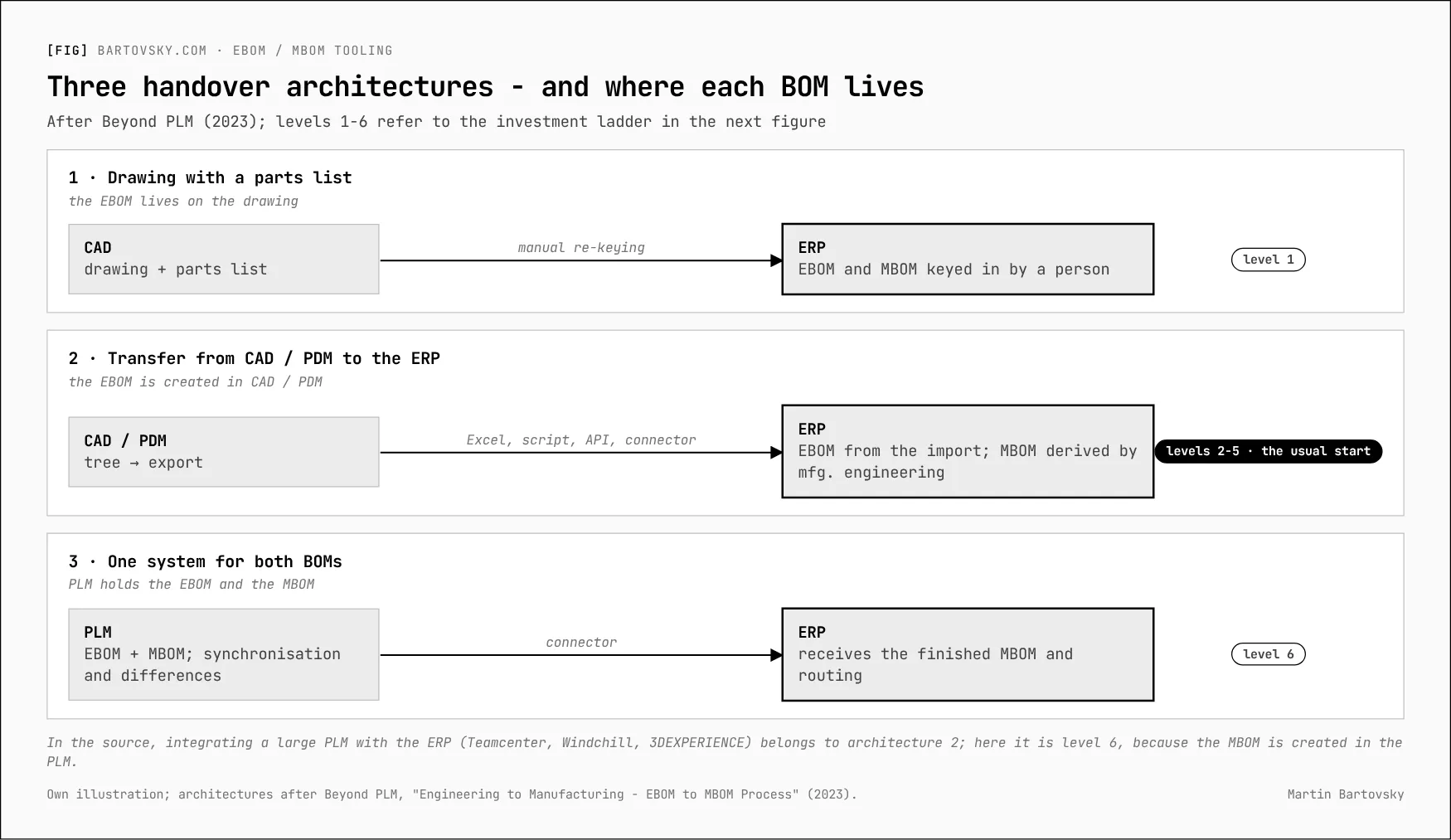
Three handover architectures
Six levels, by entry investment
The order is an estimate of entry investment (licences and implementation effort) - no source ranks the levels this way. The levels themselves are independent of the ERP vendor.
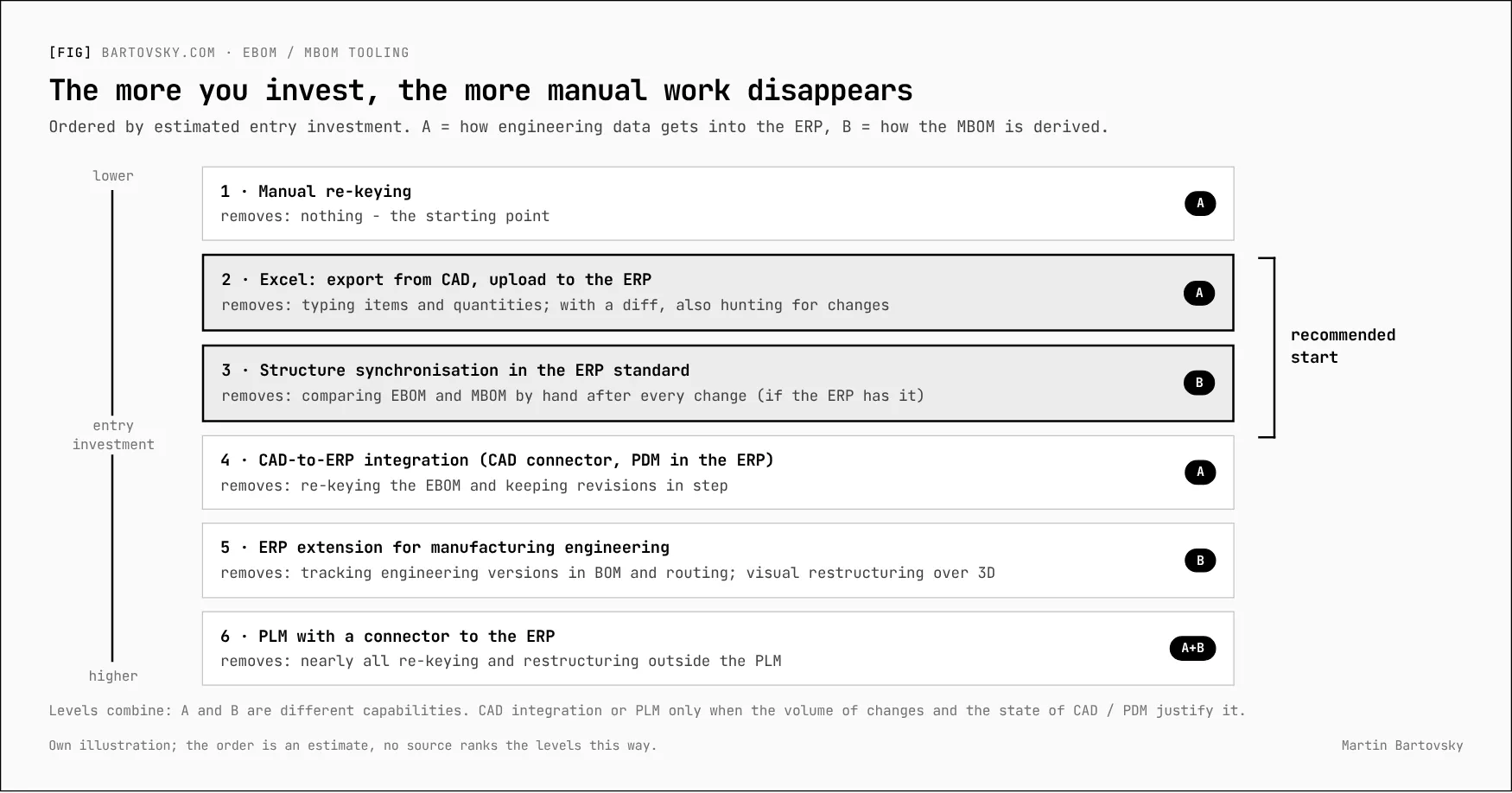
| Level | Solves | What disappears | What stays manual | Conditions |
|---|---|---|---|---|
| 1. Manual re-keying | A | Nothing - the starting point | Everything; no way to tell which revision a BOM came from | None |
| 2. Excel: export from CAD, upload to the ERP | A | Typing items and quantities; with a diff, also hunting for changes | Assigning item numbers, creating item records, everything around the MBOM | CAD can export a BOM; the upload is written or bought |
| 3. Structure synchronisation in the ERP standard | B | Comparing EBOM and MBOM by hand after every change | The manufacturing engineer’s decision on each difference | The EBOM is already in the ERP; check function and licence with the vendor |
| 4. CAD-to-ERP integration | A | Re-keying the EBOM; keeping CAD revisions and ERP documents in step | Deriving the MBOM (combine with 3 or 5) | A connector for your CAD and version; document management in the ERP |
| 5. ERP extension for manufacturing engineering | B | Tracking which engineering version is in which MBOM and routing; visual restructuring over 3D | The source of the EBOM (connector or PLM) | Separately licensed modules; a big process change |
| 6. PLM with a connector to the ERP | A + B | Nearly all re-keying and restructuring outside the PLM; changes synchronised under control | Mapping, and maintaining the connector at every upgrade | Implementing a PLM (3DEXPERIENCE, Teamcenter, Windchill, Aras and others) |
Level 2 needs no new PDM or PLM. Level 3 depends on whether the ERP has structure synchronisation, and on what it costs. Neither blocks a later move to 4 or 6 - as long as the keys are kept stable from the start.
The levels in more detail
1. Separate systems, manual re-keying. Engineering issues a drawing or a tree from CAD, and the manufacturing engineer creates the BOM in the ERP by hand. The EBOM exists only in CAD and on the drawing; nothing links them. Zero investment, the most errors, no traceability.
2. Excel: export from CAD, upload to the ERP. Common CAD systems export an assembly’s BOM to Excel or CSV straight from the model. The export usually lacks the plant, the item type and phantoms - someone has to add them. Check the export’s limits: number of rows, how patterns and mirrors are expanded, whether positions stay stable. The upload has several routes, and they are not equal:
| Route | What it’s for | Limits |
|---|---|---|
| The ERP’s migration tool | First data load at go-live | Usually first load only; changes to existing data are out of scope. Unsuitable for day-to-day changes |
| Older mass-upload tools | Historical solution in some systems | Often no longer recommended by the vendor, or restricted |
| Own upload through the ERP’s standard interfaces (API, import functions) | Creating and changing BOMs | Programmed by the implementation; comparing against the ERP and writing under a change number is a project, not a ready standard |
| Commercial Excel-to-ERP tools | Mass changes without programming | Licence; mostly available for the big ERPs |
3. Structure synchronisation in the ERP standard. Some ERPs can show the EBOM and MBOM side by side, mark the differences and transfer them under a change number. The EBOM must already be in the ERP (level 2 or 4). The function is often part of extended product-development modules and may carry its own licence. Where the ERP doesn’t have it, the comparison can live in your own upload (level 2) or move to a PLM (level 6).
4. CAD-to-ERP integration. A connector stores CAD files as documents in the ERP, linked to the item, and imports the model structure as the EBOM. Creating and updating BOMs and where-used can run automatically; more advanced connectors also create items and work with change records. It works best when engineers use item numbers from the start. Connectors tend to be tied to a specific CAD version - when the design office moves to a new CAD generation (for example from classic CAD to a PLM platform), the route changes.
5. ERP extension for manufacturing engineering. Larger ERPs offer separately licensed extensions for complex discrete manufacturing: a prepared EBOM-to-MBOM process, frozen engineering snapshots handed to manufacturing engineering, versioned BOMs and routings, and change records that steer the whole thing. Often with a visual tool where the manufacturing engineer restructures the BOM along the routing over a 3D model. Aimed at complex assembly; for series production of simple parts the benefit is debatable, for complex weldments and assemblies probably higher.
6. PLM with a connector to the ERP. The MBOM is created in the PLM; the connector sends items, EBOM and MBOM, and possibly routings, to the ERP.
| PLM | Manufacturing BOM | Route to the ERP |
|---|---|---|
| Dassault 3DEXPERIENCE + DELMIA | Roles for manufacturing items: guides, templates, EBOM and MBOM side by side | ERP vendor or partner connectors; Dassault’s own integration framework is for the public cloud only |
| Siemens Teamcenter | Teamcenter Manufacturing (accountability check of occurrences) | Teamcenter Gateway for the major ERPs: items, BOMs, routings, changes |
| PTC Windchill | MPMLink | ESI: MBOMs and process plans into the ERP |
| Aras Innovator, light cloud PLM (OpenBOM, Arena) | EBOM and MBOM, less elaborate restructuring | Connectors by ERP; weaker links to the big CAD systems - more for smaller companies |
How much work does it save? Independent numbers don’t exist. The published examples come from vendor material and user-conference presentations - minutes instead of weeks per BOM, minutes instead of hours per change notice. Treat them as illustrations, not as a business case.
What to do
The levels aren’t a ladder you have to climb rung by rung. Choose a cheap but clean start that doesn’t block a later jump.
- At go-live: the ERP’s migration tool only for the first load. For day-to-day work, an own upload from the CAD export that writes into the EBOM, compares differences and works under a change number. Keep the keys (item number, position) the way a connector will need them later.
- Right after: check whether the ERP has structure synchronisation and on what terms, and try it in a pilot where the gap between EBOM and MBOM is widest.
- Depending on the volume of changes: CAD-to-ERP integration, if a connector exists for your CAD. If engineering is or will be on a PLM platform, the route goes through PLM and a connector, not through CAD integration.
- A manufacturing-engineering extension only when it turns out that the real pain is keeping engineering versions, BOM and routing in step for complex assemblies.
The precondition for all of it: find out which CAD and PDM engineering actually uses, plant by plant. Half the table depends on it.
Questions for the implementation partner
- Which route will BOM uploads take after go-live, and can it compare differences before writing?
- Does the ERP have a standard function for uploading BOMs from Excel, and for changing existing BOMs?
- Does the ERP synchronise EBOM and MBOM structures? Is it in our licence, or extra?
- Does the concept include document management in the ERP - the precondition for CAD integration?
If your ERP is SAP S/4HANA
How the levels map to products from SAP and its partners (on-premise). Licence scope always has to be checked for your contract.
| Level | Product | What it does | Notes |
|---|---|---|---|
| 2 | Migration Cockpit, BOM API, Precisely Automate (formerly Winshuttle) | First load; BOM creation and change via API; commercial Excel uploads | Migration Cockpit is for the first load only, according to SAP |
| 3 | Product / Guided Structure Synchronization (PSS / GSS) | EBOM and MBOM side by side, differences marked, transfer under a change number | Runs in the PLM Web UI and needs set-up. SAP’s use terms place structure synchronisation in an R&D / product-engineering package - check whether your contract covers it |
| 3 | SAP Integrated Product Development - Product Handover | Cloud handover of the MBOM to S/4HANA on-premise via the PLM System Integration add-on | Separately licensed cloud service |
| 4 | SAP Engineering Control Center (ECTR) with interfaces to CATIA V5, NX, Creo, SolidWorks, Inventor and others | CAD files as SAP documents linked to the material; structure import; BOM creation and update, where-used | Needs document management in SAP and ECTR plus interface licences; for 3DEXPERIENCE the route goes through PLM System Integration |
| 5 | SAP 3D Visual Enterprise Manufacturing Planner (VEMP) | Visual BOM restructuring along the routing over a 3D model | Separately licensed; needs prepared 3D visualisation data |
| 5 | S/4HANA Manufacturing for Production Engineering and Operations (PEO) | Controlled EBOM-to-MBOM process, frozen snapshots, versioned BOMs and routings, change records, work instructions | Separately priced extension; a big process change |
| 6 | SAP PLM System Integration; partner 3DEXPERIENCE connectors; Teamcenter Gateway for S/4HANA; Windchill ESI | Materials, BOMs, documents, routings and changes from PLM | Add-ons and connectors with their own licences and upgrade effort |
Questions for an SAP implementation partner: which route will BOM uploads take after go-live (BOM API, BAPI, Precisely), and can it compare before writing? Is there a standard Fiori app for uploading BOMs from Excel in our S/4HANA release? Is PSS / GSS in our licence? Does the concept include SAP document management (DMS), the precondition for ECTR? How will item categories, BOM usage and production versions be set per production type?
The BOM series
- Your ERP will import BOMs from Excel. The second import is the problem.
- When does an intermediate deserve its own item number? Seven criteria
- Engineering changes: one number, revision or new part, and where-used first
- Ten tests for your BOM import before go-live
- From Excel to PLM: six levels of EBOM-to-MBOM tooling (this note)
- BOM health: the numbers that show the process still works
- The quote is the first version of the BOM
Further reading: Beyond PLM, Engineering to Manufacturing - EBOM to MBOM Process (2023) · PTC, MPMLink and ESI · Siemens, Teamcenter Gateway.
[->] next step
Where do your numbers stop adding up?
Start with a short call. Bring one report nobody trusts - I'll trace it back to where the data gets captured.